Help center
Welcome to The Life Network!
Find answers to your questions and help getting started here.
We're on Roku! Just search "The Life Network" and add it.
To watch TLN on your phone, laptop or tablet, sign in at watchthelife.com and enjoy.
Watch TLN on your TV
Choose your preferred device and follow the guided steps.
What are you watching from?
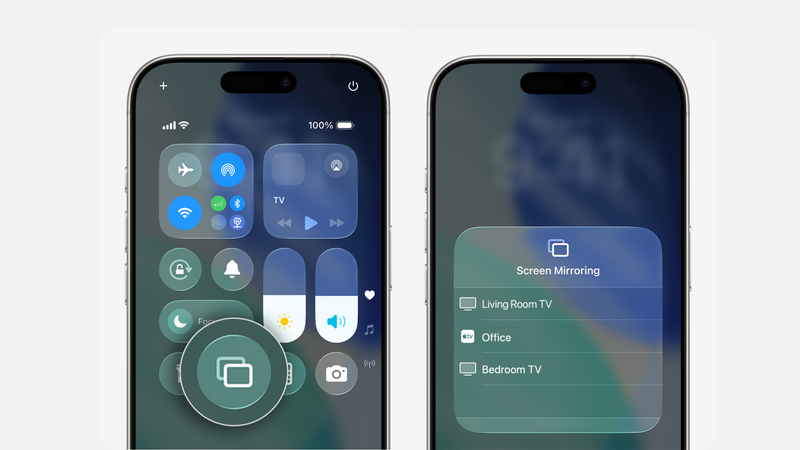
iPhone / iPad (AirPlay)
- Swipe down from the top-right corner.
- Tap Screen Mirroring and choose your TV.
- Enter the TV code if asked, then press Play.

Android phone or tablet
- Swipe down and tap Cast Screen or Smart View.
- Choose your TV and confirm if asked.
- Press Play.
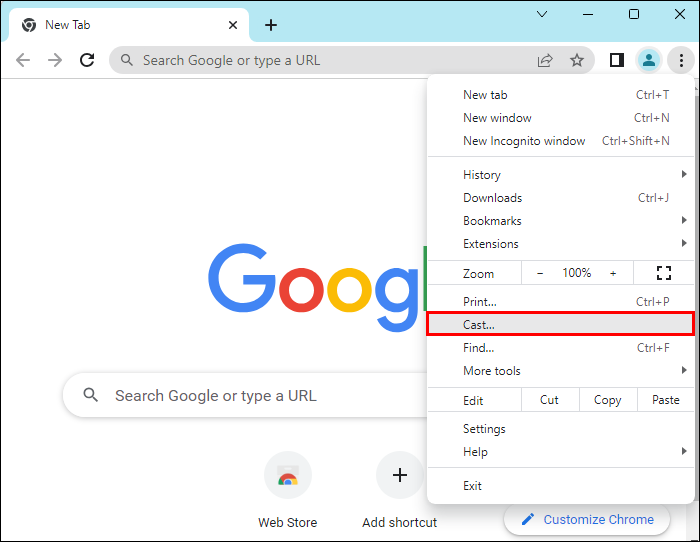
Laptop (Chrome browser)
- Open Google Chrome.
- Click the three dots, then Cast.
- Choose your TV and press Play.
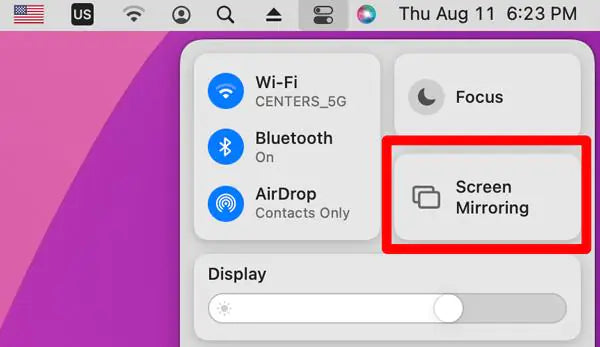
Mac laptop (Screen Mirroring)
- Click Screen Mirroring in the top-right corner.
- Select your TV and press Play.
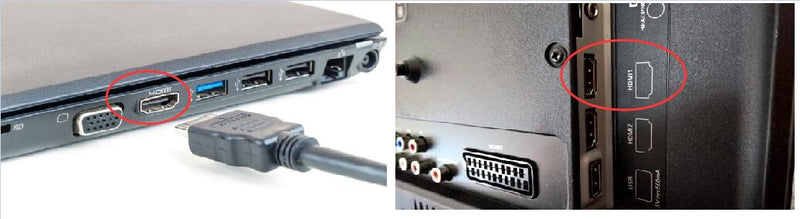
HDMI cable
- Connect the HDMI cable to your device and TV.
- Select the matching HDMI input.
- Press Play on your device.
How Can We Help?
Find answers to common questions or send our team a message.
You Might Be Wondering ...
There's no password to remember! We use a one-time passcode instead of passwords.
When you sign in, we’ll email you a short code. Enter it once and you’re in. We'll remember your device for the future. No passwords to remember or reset.
You're likely logging in with a different email than the one you used when you subscribed.
Please try again with the same email address you used when you subscribed. It'll be the email address that your subscription confirmation came to!
You can watch on:
- Phone (iPhone or Android)
- Tablet
- Laptop or desktop computer
- TV (via ROKU or casting)
All you need is a modern web browser.
TLN subscriptions start at just $9.99/month when billed annually, or $12.99/month billed monthly.
You can also choose a Premium membership for $19.99/month billed annually for extra supporter benefits like a monthly, private livestream hangout with Luke and Kayte and a TLN Choose Life coffee mug.
Due to her current workload, Kayte is not able to provide matchmaking services outside of Two by Two.
For Torah-observant singles, she recommends connecting with Sarah and Mark Oswalt, who have partnered with Whole Bible Community to offer a free matchmaking service: wholebiblecommunity.com/matchmaking
Update your payment details through the subscription management area in your account.
Confirm you are signed in with the same email used for your purchase. It's the one your subscription confirmation went to!
If access is still unavailable, contact support using the form below.
Yes! Your subscription is meant to be shared within your household. Feel free to use it with anyone who lives in your home.
Yes! You can watch five episodes of TLN shows for free (one from each of our original shows thus far!) at watchthelife.com/free
Enjoy!
Use the contact form below to tell us what device and browser you are using, which video you tried to watch, and what happened.
Apply To Be On a TLN Show
Choose an option below to learn more and apply!
Still need help?
Send us a message and our team will follow up.